Showing posts with label Design patterns. Show all posts

Thursday, 6 September 2012

FAQs -I-Design Patterns

Design patterns MVC and MVVM uses Widely

MVC , MVVM aren't these two patterns design patterns.
Yes , both MVC and MVVM are UI design.

The other design patterns prominently used in MVC and MVVM are:
a. Observer pattern
b. Command pattern
c. Strategy pattern
d. Inversion of Control

The design principle used here are
S - Separation of Concern
O - Open- Closed Principle
D - Dependency Inversion

If we use Entity Framework and RIA Services will be using the Repository Pattern as well.

What does a View Model Contain?

It is important to note that the ViewModel does not describe how the view looks. It describes how the view functions, and what information it provides to the user.
 

Difference between View and User Control

while a View is a UserControl, a UserControl is not necessarily a View
 

Do you think developer in MVVM shouldn't contain any code

Developers should refrain from writing any code in the View's code behind file that doesn't pertain purely to the GUI.
 

View and View Model Relationship

A view should only have one viewmodel but  a single viewmodel might be used by multiple views

What are the two things necessary for MVVM?

  •  A class that is either a DependencyObject or implements INotifyPropertyChanged to fully support data-binding, and
  • Some sort of commanding support.

When will you use design patterns ...Always?

A pattern is useful when it accelerates development, improves stability and performance, reduces risk, and so forth. When it slows development, introduces problems, and has your developers cringing whenever they hear the phrase "design pattern", might want to rethink on the approach.


Monday, 30 July 2012

PRISM : Explained

Using Prism you can create a WPF application , the client-side of a silverlight application and a Windows Phone applications.

The client side application of PRISM generally has a Shell, a few modules and the infrastructure to connect these:
  • Shell
  • Modules
  • Infrastructure 

Namespace

Namespace used in prism are
  • Microsoft.Practices.Composite.dll
  • Microsoft.Practices.Composite.Presentation.dll
  • Microsoft.Practices.Composite.UnityExtensions.dll
  • Microsoft.Practices.Unity.dll
  • Microsoft.Practices.ServiceLocation.dll

Shell

The foundation of the application is “The Shell”.  The Shell is the top-level window of an application based on the Prism Composite Application Library. This window is a place to host different user interface (UI) components that exposes a way for itself to be dynamically populated by others, and it may also contain common UI elements, such as menus and toolbars. The Shell window sets the overall appearance of the application.

The shell that is responsible to load the Modules.

Module 

A module represents a set of related concerns. It can include components such as views, business logic, and pieces of infrastructure, such as services for logging or authenticating users. Modules are independent of one another but can communicate with each other in a loosely coupled fashion.

Infrastructure 

The Infrastructure Assembly is a shared library referenced by both the shell project and the module projects, and holds shared types such as constants, event types, entity definitions and interfaces.

Looking inside Shell

Shell contains BootStrapper.cs

The Bootstrapper component is used by the application to initialize the various Prism components and services. It is used to initialize the dependency injection container to register any application-level components and services with it. It is also used to configure and initialize the module catalog and the shell's view and view model or presenter.

The Bootstrapper inherits from 
  • Microsoft.Practices.Composite.UnityExtensions.UnityBootstrapper 
To be able to run the bootstrapper at least one module should be registered in our application. 


Shell contains Shell.xaml on to which modules are loaded.

Modules can be loaded in the regions defined in Shell.xaml.

Regions


Regions are the placeholders for the controls defined in Modules.  Modules can be added into the shell one by one , generally we add one module at begining and then continue adding more and more.
Modules can be added to regions in shell.xaml and can be added/removed at runtime.Because our application is build with modularity in mind it’s the Module and not the Shell that should define which views need to be added to the regions.

Region Manager Service

Views are created inside modules.To add views to our regions we use the prism region manager service. The region manager service is responsible for maintaining a collection of regions and creating new regions for controls.  Typically, we interact directly with region manager service to locate regions in a decoupled way through their name and add views to those regions. By default, the UnityBootstrapper base class registers an instance of this service in the application container. This means that we can obtain a reference to the region manager service in our application by using dependency injection.

So, this is how my Shell and Module talk to each other.


and following shows the basic terms in PRISM


Bootstrapper – let’s get this party started!


  • Kicks off the application
  • Starts the main UI container (the Shell)
  • Registers Modules and loads, if needed
  • Registers any global singletons (optional)

Shell – the main view (might be a master page)


  • The main UI container
  • Houses all of the Views that will be loaded
  • Can be split into Regions
  • Knows nothing of what will be loaded into it

Regions – content areas


  • Area(s) in the Shell where Views can be placed
  • Are given a name
  • Can contain context, if needed
  • RegionManager exists to help maintain Regions

Modularity – self contained modules


  • To the user this is seamless
  • Can be developed separately
  • Does not reference other modules
  • Solution is split into Modules
  • Modules share infrastructure and Models

Inversion of Control (IoC)


  • Unity or other Dependency Injection (DI) Tools 
  • Helps for test ability and mocking
  • Abstraction
  • Container object allows classes to be registered against their interfaces
  • When an interface is requested, the container creates the class registered with the interface
  • Supports singletons

Infrastructure – common tools


  • A Silverlight class library project
  • Contains shareable items for the modules
  • Classes
  • Assets
  • Resources
  • Makes no references
  • A pure library

Commanding – Action & Reactions


  • Allows events between a View and a ViewModel through Data Binding
  • ViewModel declares the Command receiver
  • Command is declarative in XAML
  • Button – Click,ListBox (Selector) – Selected
  • Command is data bound to the ViewModel’s command receiver
  • Can be disabled/enabled based on rules

Event Aggregation: Publish – Subscribe pattern


  • Allows events of any kind to be published and subscribed to
  • Can be cross module
  • Can be filtered by subscribers
  • For example:
  • Click on a menu item in the Shell
  • Event is invoked by the publisher
  • Event is received by the subscriber
  • The subscriber then loads a View in a Region in the Shell


Conclusion

Thinking of a Prism as a set of options is probably the best way.One pick only the features one really needs, and simply skip the rest. Architecture of Prism provides flexibility, and that is the first advantage of adapting it to project.

You can also read this article at dotnetspider.

Sunday, 29 July 2012

MEF and DI/IOC


MEF and IOC are two different design patterns created for two completely different scenarios.

  1. IOC is most useful with Static dependencies , MEF is useful for dynamic dependencies.
  2. IOC is for registration of known parts whereas MEF is for discovery of unknown parts.
  3. When working with/for 3rd party dlls , MEF is more the best choice.
  4. Id you have two dlls, taking a decision at runtime to swap the two is possible using MEF and not IOC.
  5. The principle purpose of MEF is extensibility; to serve as a 'plug-in' framework for when the author of the application and the author of the plug-in (extension) are different and have no particular knowledge of each other beyond a published interface (contract) library.
  6. Plug-in versioning problem is not there in MEF , but may present in IOC.
  7. Again, MEF 'intent' is tightly focused on anonymous plug-in extensibility, something that very much differentiates it from other IoC containers. So while MEF can be used for composition, that's merely a small intersection of its capabilities relative to other IoCs, with which I suspect we'll be seeing a lot of incestuous interplay going forward.
  8.  MEF is basically using some IoC-like principles to enable application composition and dependency management.  So in some way it's kind of like IoC for your application.  It's focused on discovering components and letting your application compose itself on the fly.  It's designed for larger applications like Visual Studio.  Now that I understand it, and, yeah, it's pretty darn cool.
  9. In my opinion, IoC is more about a consistent loose-coupling pattern across your app, and in many ways the factories act like smart service providers, with the containers adding a variety of ways to configure how query resolutions are done at a particular point in time (e.g. they allow you to register bindings in config or in code, statically or dynamically, etc.)


Hosting MEF

When hosting a MEF application . following things should be considered:

  1. Are you hosting a Web application / Desktop application?
  2. Are you hosting this as an application/library?
Check the following links for more information

Once, I have successfully deployed MEF I will update the blog.

MEF : Sample application and explanation

In this post we will create a sample application and we will try to understand the terms:

  • Parts
  • Import
  • Export
  • Composition
  • Catalog
  • Contract

Parts, catalogs, and the composition container

Parts and the composition container are the basic building blocks of a MEF application. A part is any object that imports or exports a value, up to and including itself. A catalog provides a collection of parts from a particular source. The composition container uses the parts provided by a catalog to perform composition, the binding of imports to exports.

Imports and exports

Imports and exports are the way by which components communicate. With an import, the component specifies a need for a particular value or object, and with an export it specifies the availability of a value. Each import is matched with a list of exports by way of its contract.
MEF is a part of the Microsoft .NET Framework, with types primarily under the
System.ComponentModel.Composition.* namespace.

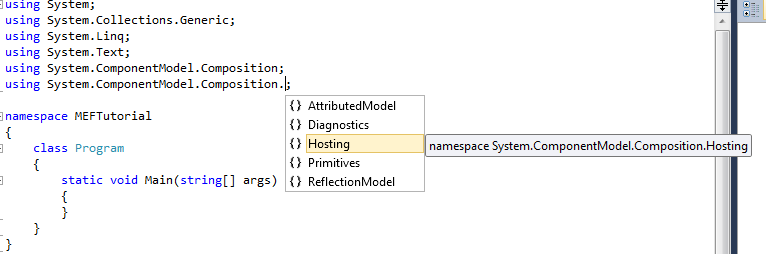
The two namespace we normally add are:
  • using System.ComponentModel.Composition;
  • using System.ComponentModel.Composition.Hosting;
The other options possible are :


The core of the MEF composition model is the composition container, which contains all the parts available and performs composition. 

The most common type of composition container is CompositionContainer.

In order to discover the parts available to it, the composition containers makes use of a catalog. A catalog is an object that makes available parts discovered from some source. 

 MEF provides catalogs to discover parts from a provided type, an assembly, or a directory. Application developers can easily create new catalogs to discover parts from other sources, such as a Web service.

The call to ComposeParts tells the composition container to compose a specific set of parts, in this case the current instance of Program. At this point, however, nothing will happen, since Program has no imports to fill.

 Now, let us import an interface ICalculator inside the program class.
The definition is similar except for the , Import attribute. This attribute declares something to be an import; that is, it will be filled by the composition engine when the object is composed.
Every import has a contract, which determines what exports it will be matched with. The contract can be an explicitly specified string, or it can be automatically generated by MEF from a given type, in this case the interface ICalculator. 

Any export declared with a matching contract will fulfill this import.

The contract is independent from the type of the importing object. (In this case, you could leave out the typeof(ICalculator). MEF will automatically assume the contract to be based on the type of the import unless you specify it explicitly.)

Bow, let us add the interface that we are importing and let us also add a class which implements this interface.

Let us decorate this class with the Export attribute, export that will match the import in Program. In order for the export to match the import, the export must have the same contract.
Now that we have added imports and exports , we need to fill the container with this, so we add followinng to the program.cs

All the logic to calculate is written in FirstCalculator class, the interface ICalculate is implemented.
So, now all the tasks for the business logic is just in 1 place FirstCalculator.
Program contains the composition container which is filled with the required import.
So, now my work is to instantiate the composition container from my main method and use it.
This is a simple example which shows a single method import and export.

But when we are going to do a real calculator we will be importing methods for add, subtract , divide , multiply etc.
A single import method won't work in this case.

 An ordinary ImportAttribute attribute is filled by one and only one ExportAttribute. If more than one is available, the composition engine produces an error. To create an import that can be filled by any number of exports, you can use the ImportManyAttribute attribute.

A good tutorial for importmany is at importmany example.

A normal question which is raised many times is

My import isn't being set, what could be wrong?

Check :
  • Is the member (property or constructor) being imported public?
  • Field imports aren't supported, use properties instead
  • Is the imported member the exact same contract type as the export?


Happy importing-exporting

Friday, 27 July 2012

PRISM : An Introduction

What is PRISM?


Prism (or Composite WPF) is a framework provided by Microsoft to help build composite WPF ,Silverlight and Window Phone 7 applications.
It has mechanisms for

  • UI composition,
  •  Module management and 
  • Dependency injection.
Prism uses the design concepts of 
  • Separation of concern
  • Loose Coupling

 Prism helps you to design and build applications using loosely coupled components that can evolve independently but which can be easily and seamlessly integrated into the overall application. These types of applications are known as composite applications.

Advantages of PRISM

  • Create an application from modules that can be built, assembled, and, optionally, deployed by independent teams using WPF or Silverlight.
  • Minimize cross-team dependencies and allow teams to specialize in different areas, such as user interface (UI) design, business logic implementation, and infrastructure code development.
  • Use an architecture that promotes reusability across independent teams.
  • Increase the quality of applications by abstracting common services that are available to all the teams.
  • Incrementally integrate new capabilities.

Important terms in PRISM

Shell:The main window of a WPF application or the top-level UserControl of a Silverlight application where the primary UI content is contained.

Region :A named location that you can use to define where a view will appear. Modules can locate and add content to a region in the layout without exact knowledge of how and where the region is visually displayed. This allows the appearance and layout to change without affecting the modules that add the content to the layout.

Region Manager:The class responsible for maintaining a collection of regions and creating new regions for controls. The RegionManager finds an adapter mapped to a WPF or Silverlight control and associates a new region to that control.

Regions allow you to define named placeholders in your main view (the “Shell”). When you initialize your module, you can inject views (e.g. user controls) into these placeholders by specifying their name. This helps separate the application layout from specific views, and allows injecting other views at run time (such as add-ins).

Region Context is a technique that can be used to share context between a parent view and child views that are hosted in a region. The RegionContext can be set through code or by using data binding XAML.


Bootstrapper:The class responsible for the initialization of an application built using the Prism Library.

Composite application: A composite application is composed of a number of discrete and independent modules. These components are integrated together in a host environment to form a single, seamless application.

Event Aggregator:A service that is primarily a container for events that allows publishers and subscribers to be decoupled so they can evolve independently. This decoupling is useful in modularized applications because new modules can be added that respond to events defined by the shell or other modules.

Module:A logical unit of separation in the application

Module Catalog:Defines the modules that the end user needs to run the application. The module catalog knows where the modules are located and the module's dependencies.

Module Manager:The main class that manages the process of validating the module catalog, retrieving modules if they are remote, loading the modules into the application domain, and invoking the module's Initialize method

View Discovery:A way to add, show, or remove views automatically in a region by associating the type of a view with a region name. Whenever a region with that name displays, the registered views will be automatically created and added to the region.

View Injection: A way to add, show, or remove views programmatically  in a region by adding or removing instances of a view to a region. The code interacting with the region does not have direct knowledge of how the region will handle displaying the view.


PRISM Architecture


When to Use View Discovery vs. View Injection

View discovery is a automatic and simple approach to composing views and getting them displayed in a region. In general, View discovery is used , but you can use view injection if you need one of the following:

  • Explicit or programmatic control over when a view is created and displayed, or when you need to remove a view from a region, for example, as a result of application logic.
  • To display multiple instances of the same views into a region, where each view instance is bound to different data.
  • To control which instance of a region a view is added (for example, if you want to add customer detail view to a specific customer detail region). Note that this scenario requires scoped regions described later in this topic.

What PRISM cannot do

  • Occasional connectivity and data synchronization
  • Service and messaging infrastructure design
  • Authentication and authorization
  • Application performance
  • Application versioning
  • Error handling and fault tolerance

Microsoft Extensibility Framework(MEF)-Introduction

What is MEF?

Managed Extensibility Framework (MEF) is a component of .NET Framework 4.0 for creating lightweight, extensible applications. It allows application developers to discover and use extensions with no configuration required. It also lets extension developers easily encapsulate code and avoid fragile hard dependencies. MEF not only allows extensions to be reused within applications, but across applications as well. MEF was introduced as a part of .NET 4.0 and Silverlight 4.


Why was MEF Introduced?

How does a dotnet application work?
If there are many libraries that are referenced in a dot net project,with CLR and JIT in the application loader tries to load only those libraries that are needed for execution at the Form_Load.Whenever a method is called ,the IL for those methods are compiled JIT on demand and loaded into memory.

This is the concept of dynamic loading of libraries.

As the Microsoft says,"The Managed Extensibility Framework (MEF) is a new library in .NET that enables greater reuse of applications and components. Using MEF, .NET applications can make the shift from being statically compiled to dynamically composed. If you are building extensible applications, extensible frameworks and application extensions, then MEF is for you."

Now, although .NET uses the concept of loading the dlls on demand but still if you run a program , remove the referenced dll from bin and as soon as the execution reaches the point where the dll has to be loaded ,you add the dll the application fails to run and exit with an error. This is the problem that MEF tries to resolve.

Without MEF also, this problem of dynamically loading the dll during execution can be solved using the concept of reflection. But the amount of time and LOC used to solve this problem is complex and high.
So, the concept of MEF entered.

  • MEF provides a standard way for the host application to expose itself and consume external extensions. Extensions, by their nature, can be reused amongst different applications. However, an extension could still be implemented in a way that is application-specific. Extensions themselves can depend on one another and MEF will make sure they are wired together in the correct order (another thing you won't have to worry about).
  • MEF offers a set of discovery approaches for your application to locate and load available extensions.
  • MEF allows tagging extensions with additional metadata which facilitates rich querying and filtering.

Looking inside MEF

MEF's core consists of a catalog and a CompositionContainer. A catalog is responsible for discovering extensions and the container coordinates creation and satisfies dependencies.

The essence of MEF paradigm is built upon the idea of needs and part that can be discovered (in order of satisfying the needs).  MEF assume that applications are build from parts, each part may have needs to   consume other parts, or may be discover and consumed by other.

 In general parts consumers care about the contract and doesn't care about the parts implementation. 

MEF using Import solves the needs  term of Contract (the contract present the capabilities that is needed). Uses Export,to Expose discoverable parts (that latter can be instantiate and consumed by the Import), the Export is also Contract based. Compose: is handle by the MEF engine, it responsible of putting the pieces together (discover and instantiate the matching Exports, and hand it to the Imports).


Basic Terms Used in MEF

  • Part: A Part is an object (e.g. a class, a method or a property) that can be imported or exported to the application.
  • Catalog: An object that helps in discovering the available composable parts from an assembly or a directory.
  • Contract: The import and exported parts need to talk between themselves via some contract (e.g. an Interface or predefined data type like string)
  • Import: It defines the need that a part has. It is applicable only for single Export Attribute.
  • ImportMany: It is similar to Import Attribute but supports for multiple Export Attributes.
  • Export: The import attribute creates the needs. The Export attribute fulfills that. It exposes those parts that will participate in the composition.
  • Compose: In MEF jargon, Compose is that area where the Exported parts will be assembled with the imported ones.

Advantages

  • MEF breaks the tightly coupled dependencies across the application but respects the type checking of the loosely coupled parts.
  • Applications can be extended.
  • Components can be added at runtime.
  • Dynamic discovery of the components.
  • Great piece of reusability.

Conclusion


MEF works upon the principle of demand and supply ;needs of parts. 
Step 1:Parts and needs should be decorated with Import and Export attributes.
Step 2:The needs and parts must agree to the contract
Step 3:Using Catalog MEF discovers the parts to be plugged in
Step 4: Composition engine makes sure that parts satisfy the contract.


Thursday, 26 July 2012

Difference Between MVC ,MVP and MVVM


The common motivation behind all MVC,MVP and MVVM is separation of concerns.
Advantages of these approaches are
  • good for UI designers
  • swapping UIs (for instance windows to web)
  • make UI easy for Unit Testing, etc. 
    Following table gives the differences between the three patterns


             MVC                                           MVP


MVVM


Model-view-Controller (MVC)

  • MVC architecture in .net is useful in the independent development, maintenance and testing every component without interrupting with the other. 
  • MVC.Net is often used in the web platform that uses either HTML or XHTML. 
  • MVC pattern in asp.net can be very flexible for the programmers as testing, design, maintenance and development can be effectively handled. 
  • MVC  applications functions distinctively in that the user interacts with the user interface and the controller will be able to handle the information from the interface. Both the end users and the software programmers are highly benefited by this software.
  •  Hence the use of MVC architecture c# programs can be highly beneficiary for any business holders. Asp .net MVC design and development can be faster in processing and can they can keep the system performance high. 
  • Let us see the three components
What is a Model?

  • MVC model is basically a C# or VB.NET class
  • A model is accessible by both controller and view
  • A model can be used to pass data from Controller to view
  • A view can use model to display data in page.
What is a View?

  • View is an ASPX page without having a code behind file
  • All page specific HTML generation and formatting can be done inside view
  • One can use Inline code (server tags ) to develop dynamic pages
  • A request to view (ASPX page) can be made only from a controller’s action method

What is a Controller?

  • Controller is basically a C# or VB.NET class which inherits system.mvc.controller
  • Controller is a heart of the entire MVC architecture
  • Inside Controller’s class action methods can be implemented which are responsible for responding to browser OR calling views.
  • Controller can access and use model class to pass data to views
  • Controller uses ViewData to pass any data to view
Advantages
The main advantage of using the MVC pattern is :
  • That it makes the code of the user interface more testable
  • It makes a very structured approach onto the process of designing the user interface, which in itself contributes to writing clean, testable code, that will be easy to maintain and extend
  • The Model-View-Controller is a well-proven design pattern to solve the problem of separating data (model) and user interface (view) concerns, so that changes to the user interface do not affect the data handling, and that the data can be changed without impacting/changing the UI. 
  • The MVC solves this problem by decoupling data access and business logic layer from UI and user interaction, by introducing an intermediate component: the controller. This MVC architecture enables the creation of reusable components within a flexible program design (components can be easily modified)
Limitations
  This design approach is not suitable for smaller applications. It Overkills the small applications.

Adapter Pattern


What is Adapter pattern?

The adapter pattern is adapting between classes and objects. 


Explanation

Like any adapter in the real world it is used to be an interface, a bridge between two objects.
In real world we have adapters for power supplies, adapters for camera memory cards, and so on. Probably everyone have seen some adapters for memory cards. If you can not plug in the camera memory in your laptop you can use and adapter.You plug the camera memory in the adapter and the adapter in to laptop slot. 


public class Rectangle
{
public int Width;
public int Height;
}
public class Calculator
{
public int GetArea(Rectangle rectangle)
{
int area = rectangle.Width * rectangle.Height;
return area;
}
}
As we cn see from the above example an instance of Rectangle is needed to calculate the area. If we have a square class of definition below, the calculation cannot be done.
public class Square
{
public int Size;
}
Here we have to create a new CalculatorAdapter to get the work done.
public class CalculatorAdapter
{
public int GetArea(Square square)
{
Calculator calculator = new Calculator();
Rectangle rectangle = new Rectangle();
rectangle.Width = rectangle.Height = square.Size;
int area = calculator.GetArea(rectangle);
return area;
}
}
The CalculatorAdapter performs the following functions:
· Takes the Square parameter
· Convert Square to Rectangle
· Call the original Calculator.GetArea() method
· Return the value received
The invoking code is shown below:
// Create Square class and assign Size from UI
Square square = new Square();
square.Size = SquarePanel.Width;
// Use Adapter to calculate the area
CalculatorAdapter adapter = new CalculatorAdapter();
int area = adapter.GetArea(square);
// Display the result back to UI
ResultLabel.Text = “Area: ” + area.ToString();


Design patterns in .net


What are Design Patterns?

To say what design patterns are in a single sentence is difficult but we can say as design patterns are :
Solutions to recurring design problems.
They are a set of rule which help the developer to accomplish a certain task.
Design patterns are architectural patterns and generalized solutions , which can be applied when needed.
These are standardized and efficient solutions to software design and programming problems that are re-usable.
Generally Gang-of-Four(GoF) are used.

Why to Use Design Patterns?

Design patterns are proven solution templates, using design templates not only reduces the overhead of architecting a solution afresh but these are also  optimized ,easy to do , easy to learn solutions.


What are the common design patterns used?

CREATIONAL
creational design patterns are design patterns that deal with object creation mechanisms, trying to create objects in a manner suitable to the situation
STRUCTURAL
Design Patterns that ease the design by identifying a simple way to realize relationships between entities.
BEHAVIOURIAL
Identify common communication patterns between objects and realize these patterns.


CREATIONAL PATTERNS

  Abstract Factory
  Creates an instance of several families of classes
  Builder
  Separates object construction from its representation
  Factory Method
  Creates an instance of several derived classes
  Prototype
  A fully initialized instance to be copied or cloned
  Singleton
  A class of which only a single instance can exist


STRUCTURAL PATTERNS

  Adapter
  Match interfaces of different classes
  Bridge
  Separates an object’s interface from its implementation
  Composite
  A tree structure of simple and composite objects
  Decorator
  Add responsibilities to objects dynamically
  Facade
  A single class that represents an entire subsystem
  Flyweight
  A fine-grained instance used for efficient sharing
  Proxy
  An object representing another object

BEHAVIORIAL

  Chain of Resp.
  A way of passing a request between a chain of objects
  Command
  Encapsulate a command request as an object
  Interpreter
  A way to include language elements in a program
  Iterator
  Sequentially access the elements of a collection
  Mediator
  Defines simplified communication between classes
  Memento
  Capture and restore an object's internal state
  Observer
  A way of notifying change to a number of classes
  State
  Alter an object's behavior when its state changes
  Strategy
  Encapsulates an algorithm inside a class
  Template Method
  Defer the exact steps of an algorithm to a subclass
  Visitor
  Defines a new operation to a class without change

Patterns I have used?

I have used Creational and Structural and have never implemented any Behaviorial Pattern.

In Creational I have used:
  • Abstract Factory
  • Factory Method
  • Singleton Method

In Structural I have used
  • Adapter Pattern
  • Facade Pattern
Other patterns I know are:
  • Decorator
  • Builder
  • Iterator


Can we create our own pattern?

Whenever a certain solution that is reusable in a vast majority of your projects, it can be abstracted to a design pattern and cab be used across the organisation.

Abstract Factory


What is Abstract factory

To create an abstract factory ,provide an interface for creating families of related or dependent objects without specifying their concrete classes.

Explanation

Abstract factory is the extension of basic Factory pattern. It provides Factory interfaces for creating a family of related classes.In an Abstract Factory class implementation you declare interfaces for Factories, which will in turn work in similar fashion as with Factories.


public interface IFactory1
    {
        IPeople GetPeople();
    }
    public class Factory1 : IFactory1
    {
        public IPeople GetPeople()
        {
            return new Villagers();
        }
    }

    public interface IFactory2
    {
        IProduct GetProduct();
    }
    public class Factory2 : IFactory2
    {
        public IProduct GetProduct()
        {
            return new IPhone();
        }
    }

    public abstract class AbstractFactory12
    {
        public abstract IFactory1 GetFactory1();
        public abstract IFactory2 GetFactory2();
    }

    public class ConcreteFactory : AbstractFactory12
    {

        public override IFactory1 GetFactory1()
        {
            return new Factory1();
        }

        public override IFactory2 GetFactory2()
        {
            return new Factory2();
        }
    }


Where to Use

We should use the Abstract Factory design pattern when:
  • The system needs to be independent from the way the products it works with are created.
  • The system is or should be configured to work with multiple families of products.
  • A family of products is designed to work only all together.T
  • The creation of a library of products is needed, for which is relevant only the interface, not the implementation.

Conclusion


  • The abstract factory class defines the abstract methods that have to be implemented by concrete factory classes. It serves as interface and contract definition.
  • The methods return values are also defined by abstract classes, this allows a high flexibility and independence, leading to methods that must only be implemented once.