Showing posts with label MEF. Show all posts

Sunday, 29 July 2012

MEF and DI/IOC


MEF and IOC are two different design patterns created for two completely different scenarios.

  1. IOC is most useful with Static dependencies , MEF is useful for dynamic dependencies.
  2. IOC is for registration of known parts whereas MEF is for discovery of unknown parts.
  3. When working with/for 3rd party dlls , MEF is more the best choice.
  4. Id you have two dlls, taking a decision at runtime to swap the two is possible using MEF and not IOC.
  5. The principle purpose of MEF is extensibility; to serve as a 'plug-in' framework for when the author of the application and the author of the plug-in (extension) are different and have no particular knowledge of each other beyond a published interface (contract) library.
  6. Plug-in versioning problem is not there in MEF , but may present in IOC.
  7. Again, MEF 'intent' is tightly focused on anonymous plug-in extensibility, something that very much differentiates it from other IoC containers. So while MEF can be used for composition, that's merely a small intersection of its capabilities relative to other IoCs, with which I suspect we'll be seeing a lot of incestuous interplay going forward.
  8.  MEF is basically using some IoC-like principles to enable application composition and dependency management.  So in some way it's kind of like IoC for your application.  It's focused on discovering components and letting your application compose itself on the fly.  It's designed for larger applications like Visual Studio.  Now that I understand it, and, yeah, it's pretty darn cool.
  9. In my opinion, IoC is more about a consistent loose-coupling pattern across your app, and in many ways the factories act like smart service providers, with the containers adding a variety of ways to configure how query resolutions are done at a particular point in time (e.g. they allow you to register bindings in config or in code, statically or dynamically, etc.)

Hosting MEF

When hosting a MEF application . following things should be considered:

  1. Are you hosting a Web application / Desktop application?
  2. Are you hosting this as an application/library?
Check the following links for more information

Once, I have successfully deployed MEF I will update the blog.

MEF : Sample application and explanation

In this post we will create a sample application and we will try to understand the terms:

  • Parts
  • Import
  • Export
  • Composition
  • Catalog
  • Contract

Parts, catalogs, and the composition container

Parts and the composition container are the basic building blocks of a MEF application. A part is any object that imports or exports a value, up to and including itself. A catalog provides a collection of parts from a particular source. The composition container uses the parts provided by a catalog to perform composition, the binding of imports to exports.

Imports and exports

Imports and exports are the way by which components communicate. With an import, the component specifies a need for a particular value or object, and with an export it specifies the availability of a value. Each import is matched with a list of exports by way of its contract.
MEF is a part of the Microsoft .NET Framework, with types primarily under the
System.ComponentModel.Composition.* namespace.

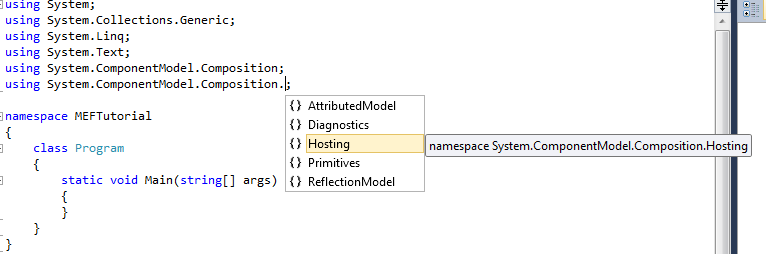
The two namespace we normally add are:
  • using System.ComponentModel.Composition;
  • using System.ComponentModel.Composition.Hosting;
The other options possible are :


The core of the MEF composition model is the composition container, which contains all the parts available and performs composition. 

The most common type of composition container is CompositionContainer.

In order to discover the parts available to it, the composition containers makes use of a catalog. A catalog is an object that makes available parts discovered from some source. 

 MEF provides catalogs to discover parts from a provided type, an assembly, or a directory. Application developers can easily create new catalogs to discover parts from other sources, such as a Web service.

The call to ComposeParts tells the composition container to compose a specific set of parts, in this case the current instance of Program. At this point, however, nothing will happen, since Program has no imports to fill.

 Now, let us import an interface ICalculator inside the program class.
The definition is similar except for the , Import attribute. This attribute declares something to be an import; that is, it will be filled by the composition engine when the object is composed.
Every import has a contract, which determines what exports it will be matched with. The contract can be an explicitly specified string, or it can be automatically generated by MEF from a given type, in this case the interface ICalculator. 

Any export declared with a matching contract will fulfill this import.

The contract is independent from the type of the importing object. (In this case, you could leave out the typeof(ICalculator). MEF will automatically assume the contract to be based on the type of the import unless you specify it explicitly.)

Bow, let us add the interface that we are importing and let us also add a class which implements this interface.

Let us decorate this class with the Export attribute, export that will match the import in Program. In order for the export to match the import, the export must have the same contract.
Now that we have added imports and exports , we need to fill the container with this, so we add followinng to the program.cs

All the logic to calculate is written in FirstCalculator class, the interface ICalculate is implemented.
So, now all the tasks for the business logic is just in 1 place FirstCalculator.
Program contains the composition container which is filled with the required import.
So, now my work is to instantiate the composition container from my main method and use it.
This is a simple example which shows a single method import and export.

But when we are going to do a real calculator we will be importing methods for add, subtract , divide , multiply etc.
A single import method won't work in this case.

 An ordinary ImportAttribute attribute is filled by one and only one ExportAttribute. If more than one is available, the composition engine produces an error. To create an import that can be filled by any number of exports, you can use the ImportManyAttribute attribute.

A good tutorial for importmany is at importmany example.

A normal question which is raised many times is

My import isn't being set, what could be wrong?

Check :
  • Is the member (property or constructor) being imported public?
  • Field imports aren't supported, use properties instead
  • Is the imported member the exact same contract type as the export?


Happy importing-exporting

Friday, 27 July 2012

Microsoft Extensibility Framework(MEF)-Introduction

What is MEF?

Managed Extensibility Framework (MEF) is a component of .NET Framework 4.0 for creating lightweight, extensible applications. It allows application developers to discover and use extensions with no configuration required. It also lets extension developers easily encapsulate code and avoid fragile hard dependencies. MEF not only allows extensions to be reused within applications, but across applications as well. MEF was introduced as a part of .NET 4.0 and Silverlight 4.


Why was MEF Introduced?

How does a dotnet application work?
If there are many libraries that are referenced in a dot net project,with CLR and JIT in the application loader tries to load only those libraries that are needed for execution at the Form_Load.Whenever a method is called ,the IL for those methods are compiled JIT on demand and loaded into memory.

This is the concept of dynamic loading of libraries.

As the Microsoft says,"The Managed Extensibility Framework (MEF) is a new library in .NET that enables greater reuse of applications and components. Using MEF, .NET applications can make the shift from being statically compiled to dynamically composed. If you are building extensible applications, extensible frameworks and application extensions, then MEF is for you."

Now, although .NET uses the concept of loading the dlls on demand but still if you run a program , remove the referenced dll from bin and as soon as the execution reaches the point where the dll has to be loaded ,you add the dll the application fails to run and exit with an error. This is the problem that MEF tries to resolve.

Without MEF also, this problem of dynamically loading the dll during execution can be solved using the concept of reflection. But the amount of time and LOC used to solve this problem is complex and high.
So, the concept of MEF entered.

  • MEF provides a standard way for the host application to expose itself and consume external extensions. Extensions, by their nature, can be reused amongst different applications. However, an extension could still be implemented in a way that is application-specific. Extensions themselves can depend on one another and MEF will make sure they are wired together in the correct order (another thing you won't have to worry about).
  • MEF offers a set of discovery approaches for your application to locate and load available extensions.
  • MEF allows tagging extensions with additional metadata which facilitates rich querying and filtering.

Looking inside MEF

MEF's core consists of a catalog and a CompositionContainer. A catalog is responsible for discovering extensions and the container coordinates creation and satisfies dependencies.

The essence of MEF paradigm is built upon the idea of needs and part that can be discovered (in order of satisfying the needs).  MEF assume that applications are build from parts, each part may have needs to   consume other parts, or may be discover and consumed by other.

 In general parts consumers care about the contract and doesn't care about the parts implementation. 

MEF using Import solves the needs  term of Contract (the contract present the capabilities that is needed). Uses Export,to Expose discoverable parts (that latter can be instantiate and consumed by the Import), the Export is also Contract based. Compose: is handle by the MEF engine, it responsible of putting the pieces together (discover and instantiate the matching Exports, and hand it to the Imports).


Basic Terms Used in MEF

  • Part: A Part is an object (e.g. a class, a method or a property) that can be imported or exported to the application.
  • Catalog: An object that helps in discovering the available composable parts from an assembly or a directory.
  • Contract: The import and exported parts need to talk between themselves via some contract (e.g. an Interface or predefined data type like string)
  • Import: It defines the need that a part has. It is applicable only for single Export Attribute.
  • ImportMany: It is similar to Import Attribute but supports for multiple Export Attributes.
  • Export: The import attribute creates the needs. The Export attribute fulfills that. It exposes those parts that will participate in the composition.
  • Compose: In MEF jargon, Compose is that area where the Exported parts will be assembled with the imported ones.

Advantages

  • MEF breaks the tightly coupled dependencies across the application but respects the type checking of the loosely coupled parts.
  • Applications can be extended.
  • Components can be added at runtime.
  • Dynamic discovery of the components.
  • Great piece of reusability.

Conclusion


MEF works upon the principle of demand and supply ;needs of parts. 
Step 1:Parts and needs should be decorated with Import and Export attributes.
Step 2:The needs and parts must agree to the contract
Step 3:Using Catalog MEF discovers the parts to be plugged in
Step 4: Composition engine makes sure that parts satisfy the contract.