Friday, 31 August 2012

WCF - Notes 7 Tools


Tool Support: WCF and Visual Studio

WCF has a tight relationship with Visual Studio, which provides a number of WCF-specific capabilities. They include the following:
·         Several WCF-specific project types to make it easier for developers to get started creating typical WCF applications. These include projects for building:
·         A Website or Web application that hosts a WCF service;
·         A library implementation of a WCF service;
·         A WCF application that exposes syndication feeds using RSS or ATOM;
·         A WCF service designed for use by an AJAX client. This service is automatically configured to use the WebHttpBinding with JSON encoding.
·         An AddServiceReference function that lets a developer specify an existing service’s endpoint, then let Visual Studio automatically generate a WCF proxy for that service.
·         The ability to generate a client for testing new WCF-based Web services.
·         A WCF Autohost that can automatically host a library-based WCF service.
·         The Service Configuration Editor, a tool that makes creating and modifying WCF configuration files easier.
·         IntelliSense for WCF configuration, allowing statement completion when creating XML elements in configuration files

WCF - Notes 6 Workflow Service


Creating a Workflow Service

As its name suggests, Windows Workflow Foundation (WF) lets developers create workflow-based applications. WF workflows can be useful in a variety of different situations. For example, WF can make it easier to create scalable applications that pause, perhaps for a long time, while waiting for input. Whatever its purpose, every WF workflow is built from activities, each of which performs some function. An activity might do something simple, such as implement a While statement, or carry out a more complex task, such as executing custom business logic.
While it’s certainly not required, a developer can use WF to create the logic for a WCF service. Known as a workflow service, this technology combination often makes sense. The developer builds scalable business logic as a WF workflow, then lets that workflow’s activities interact with the outside world via WCF services.
To help do this, WF includes several activities specifically intended to allow WCF communication. For example, the Send activity sends a message via WCF, while the Receive activity receives a message. WCF 4 also allows correlation of multiple requests sent to a particular workflow instance. For example, suppose an instance of a workflow sends a request via WCF, then pauses waiting for a message in response. While it’s waiting, this workflow instance will be deactivated, with its state stored on disk. When a response message arrives, WCF can determine from the message’s contents which workflow instance it’s intended for—it can correlate this response message with the request message sent earlier. The target workflow instance can then be reactivated and the message delivered to the appropriate activity in that workflow.
Not every WCF service should be built using WF. In a surprisingly large number of cases, however, using WF and WCF together is the right choice. Workflow services can be useful things.

WCF - Notes 5 Security and Transactions


Security

  • Exposing services on a network, even an internal network, usually requires some kind of security. How can the service be certain of its client’s identity? How can messages sent to and from a service be kept safe from malicious changes and prying eyes? And how can access to a service be limited to only those authorized to use it? Without some solution to these problems, it’s too dangerous to expose many kinds of services. Yet building secure distributed applications is difficult. Ideally, there should be straightforward ways to address common security scenarios, along with more fine-grained control for applications that need it.
  • To help achieve this, WCF provides the core security functions of authentication, message integrity, message confidentiality, and authorization. All of these depend fundamentally on the notion of identity: who is this user? Establishing an identity for a client or service requires supplying information such as a username and password, an X.509 certificate, or something else. A client or service can do this by directly invoking a WCF function, by using a config file, or in other ways, such as by referencing a certificate store. However it’s done, establishing an identity is an essential part of using WCF security.
  • Distributed security can get very complicated very fast. A primary goal of WCF’s designers was to make building secure applications easier. To allow this, WCF’s approach to authentication, data integrity and data privacy relies on bindings. Rather than require developers to insert the right attributes to secure each class and method, they can instead just use a binding that provides the right set of security services. A developer’s choices include the following:
  • Use a standard binding that directly supports security. For example, applications that require end-to-end security for messages that go through multiple SOAP intermediaries can use a binding that supports WS-Security, such as WsHttpBinding.
  • Use a standard binding that optionally supports security, then configure it as needed. For example, applications that need only transport-based security can choose BasicHttpBinding, configuring it to use HTTPS rather than HTTP. It’s also possible to customize other more-advanced security behaviors. For example, the authentication mechanism used by a binding such as WsHttpBinding can be changed if desired.
  • Create a custom binding that provides exactly the security behavior a developer needs. Doing this is not for the faint of heart, but it can be the right solution for some problems.
  • Use a standard binding that provides no support for security, such as BasicHttpBinding. While using no security is often a risky thing to do, it can sometimes be the only option.
<configuration>
  <system.serviceModel>
    <services>
      <service
        type="RentalReservations,RentalApp"
        <endpoint
          contract="IReservations"
          binding="basicHttpBinding"
          bindingConfiguration="UsingHttps"
          address=
            ”http://www.fabrikam.com/reservation/reserve.svc"/>
      </service>
    </services>
    <bindings>
        <basicHttpBinding>
        <binding
          configurationName="UsingHttps"
          securityMode="Https"/>
      </basicHttpBinding>
    </bindings>
  </system.serviceModel>
</configuration>
  • A WCF service can also control which clients are authorized to use its services. To do this, WCF relies on existing authorization mechanisms in the .NET Framework. A service can use the standard PrincipalPermission attribute, for example, to define who is allowed to access it. Alternatively, a WCF application that needed role-based authorization could use Windows Authorization Manager to implement this.
  • Transactions
  • Handling transactions is an important aspect of building many kinds of business logic. Yet using transactions in a service-oriented world can be problematic. Distributed transactions assume a high level of trust among the participants, so it often isn’t appropriate for a transaction to span a service boundary. Still, since there are situations where combining transactions and services makes sense, WCF includes support for this important aspect of application design.
  • Transactions in the .NET Framework: System.Transactions
  • The transaction support in WCF builds on System.Transactions, a .NET Framework namespace focused solely on controlling transactional behaviors. Although it’s not required, developers commonly use the services of System.Transactions in concert with an execution context. An execution context allows the specification of common information, such as a transaction, that applies to all code contained within a defined scope. Here’s an example of how an application can use this approach to group a set of operations into a single transaction:
using System.Transactions;
using (TransactionScope ts =
   new TransactionScope(TransactionScopeOption.Required)) {
   // Do work, e.g., update different DBMSs
   ts.Complete();
}
  • All of the operations within the using block will become part of a single transaction, since they share the transactional execution context it defines. The last line in this example, calling the TransactionScope‘s Complete method, will result in a request to commit the transaction when the block is exited. This approach also provides built-in error handling, aborting the transaction if an exception is raised.
  • Specifying TransactionScopeOption.Required for the new TransactionScope, as this example does, means that this code will always run as part of a transaction: joining its caller’s transaction if one exists, creating a new one if it does not.
  • Unlike Enterprise Services and its predecessors Microsoft Transaction Server (MTS) and COM+, however, System.Transactions is focused entirely on controlling transactional behavior. There is no required connection between a transaction and the internal state of an object, for example. While Enterprise Services requires an object to be deactivated when it ends a transaction, System.Transactions makes no such demand. Since WCF builds on System.Transaction, WCF-based applications are also free to manage transactions and object state independently.
  • WCF-based applications can use the types in System.Transactions directly, or they can control transactions using WCF-defined attributes that rely on System.Transactions under the covers. 
  •  A service’s methods can control transactional behavior via an attribute. Rather than explicitly relying on System.Transactions, a service can use the OperationBehavior attribute described earlier.
[OperationContract]
[OperationBehavior(TransactionScopeRequired=true,
                   TransactionAutoComplete=true)]
private int Reserve(int vehicleClass, int location, string dates)
{
  int confirmationNumber;
  // logic to reserve rental car goes here
  return confirmationNumber;
}
  • Finally, it’s worth emphasizing that applications built on WCF can participate in transactions that include applications running on non-WCF platforms. For example, a WCF-based application might start a transaction, update a record in a local SQL Server database, then invoke a Web service implemented on a Java EE-based application server that updates a record in another database. If this service is transactional and the platform it’s running on supports the WS-AtomicTransaction specification, both database updates can be part of the same transaction. Like security and reliable messaging, WCF transactions can work in the heterogeneous world that Web services make possible.

WCF - Notes 4 WCF Client


Creating a WCF Client

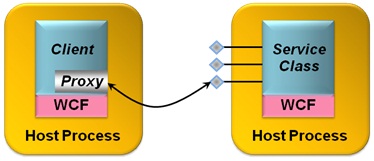
WCF Client talks to WCF service with a proxy.


A WCF client can use a proxy to access a service.
  • Creating a proxy requires knowing what contract is exposed by the target endpoint, and then using the contract’s definition to generate the proxy. In WCF, this process can be performed using either Visual Studio or the command-line svcutil tool.
  • If the service is implemented using WCF, these tools can access the service’s DLL to learn about the contract and generate a proxy. If only the service’s WSDL definition is available, the tools can read this to produce a proxy.
  •  If only the service itself is available, Visual Studio and svcutil can access it directly using either WS-MetadataExchange or a simple HTTP GET to acquire the service’s WSDL interface definition, and then generate the proxy.
  • However it’s generated, the client can create a new instance of the proxy, and then invoke the service’s methods using it.
  • Good programming practice to clean up the communications infrastructure that has been created.
  • One more thing remains to be specified by the client: the exact endpoint on which it wishes to invoke operations. Like a service, the client must specify the endpoint’s contract, its binding and its address, and this is typically done in a config file. In fact, if enough information is available, svcutil will automatically generate an appropriate client configuration file for the target service.
WCF supports several possibilities along with traditional RPC, including the following:
·         Asynchronous RPC, with non-blocking paired calls carrying lists of typed parameters.
·         Traditional messaging, with non-blocking calls carrying a single message parameter. Working directly with channels exposes methods to send and receive messages, and WCF defines a standard Message class that can be used to work directly with XML messages.
·         Direct manipulation of SOAP messages using the WCF-defined attribute MessageContract. Using two related attributes, MessageHeader and MessageBodyMember, an application can explicitly access the contents of a SOAP message’s header and body.
  • To allow creating a method that sends information but doesn’t block waiting for a response, the OperationContract attribute has a property called IsOneWay. Methods marked with this attribute and property can have only input parameters and must return void.
[OperationContract(IsOneWay=true)]
void NewCarAvailable(int vehicleClass, int location);
  • With this method, the caller gets nothing in return—it’s one-way communication. A typical use of one-way methods like this is to send unsolicited events.
  • It’s also possible to link together calls to methods, whether one-way or normal two-way methods, allowing both sides of the communication to act as client and service. To do this, each side implements a contract that’s linked with its partner, resulting in what are called duplex contracts. WCF provides special bindings for handling this case, such as WsDualHttpBinding for duplex contracts that use standard interoperable SOAP.

Controlling Local Behavior

  • How is concurrent access to a service instance managed, for example, and how is that instance’s lifetime controlled? To allow developers to set local behaviors like these, WCF defines two primary attributes, both of which have a number of properties. One of these attributes, ServiceBehavior, can be applied to any service class. The other, OperationBehavior, can be applied to any method in a service class that is also marked with the OperationContract attribute.
  • The ServiceBehavior attribute has various properties that affect the behavior of the service as a whole. For example, a property called ConcurrencyMode can be used to control concurrent access to the service. If set to Single, WCF will deliver only one client request at a time to this service, i.e., the service will be single-threaded. If this property is set to Multiple, WCF will deliver more than one client request at a time to the service, each running on a different thread. Similarly, ServiceBehavior’s InstanceContextMode property can be used to control how instances of a service are created and destroyed. If InstanceMode is set to PerCall, a new instance of the service will be created to handle each client request, and then destroyed when the request is completed. If it’s set to PerSession, however, the same instance of the service will be used to handle all requests from a particular client. (Doing this also requires setting ServiceContract‘s Session attribute to true and choosing a binding that supports sessions.) InstanceContextMode can also be set to Single, which causes a single instance of the service to handle all requests from all clients.
using System.ServiceModel;
[ServiceContract]
[ServiceBehavior(
   ConcurrencyMode=Multiple,
   InstanceContextMode=Single)]
class RentalReservations { ... }
  • Similarly, properties on the OperationBehavior attribute allow controlling the impersonation behavior of the method that implements a particular operation, its transactional requirements (described later), and other things.
  • Another aspect of local behavior is how a request from a client is routed within a WCF service. WCF in the .NET Framework 4 adds a standard content-based routing service that a developer can use with SOAP-based services. The routing service sits in front of other WCF services, routing each incoming message to one of those services based on the message’s content. 

WCF- Notes 3 Hosting


Selecting a Host

·         A WCF service class is typically compiled into a library. By definition, all libraries need a host Windows process to run in. WCF provides two main options for hosting libraries that implement services. One is to use a host process created by either:
ü  Internet Information Services (IIS) or a
ü  Related technology called the Windows Activation Service (WAS).
ü  The other allows a service to be hosted in an arbitrary process. 

Hosting a Service Using IIS or WAS

·         The simplest way to host a WCF service is to rely on IIS or WAS. Both rely on the notion of a virtual directory, which is just a shorter alias for an actual directory path in the Windows file system.
·         IIS-hosted WCF services can only be accessed using SOAP over HTTP. No other transport protocols are supported.
·         Although WAS doesn’t require a Web server to be installed on the system, WCF services hosted in IIS obviously do.
·         Whatever choice is made, both WAS and IIS provide WCF services with a range of support, such as the ability to configure automatic process recycling.
·         To allow a WCF service to take requests from its clients, the process that hosts it must remain running. With WAS-hosted services, the standard process ensures the host remains running, but a hosting application must solve this problem on its own. A WCF service hosted console would be running in a Windows service, allowing it to be started when a system boots, or be hosted in a GUI application, such as one built with Windows Presentation Foundation.

WCF : Notes 2 Service class


Implementing a Service Class

A service class is a class like any other, but it has a few additions. These additions allow the class’s creator to define one or more contracts that this class implements. Each service class implements at least one service contract, which defines the operations this service exposes. The class might also provide an explicit data contract, which defines the data those operations convey.


Defining Service Contracts

·         Every service class implements methods for its clients to use. The creator of the class determines which of its methods are exposed as client-callable operations by specifying that they are part of some service contract. To do this, a developer uses the WCF-defined attribute ServiceContract. In fact, a service class is just a class that either is itself marked with the ServiceContract attribute or implements an interface marked with this attribute. 
·         Namespace used here is using System.ServiceModel;

        Class should be decorated as [ServiceContract] attribute

using System.ServiceModel;
[ServiceContract]
class RentalReservations
{
}
·             

       Each method in a service class that can be invoked by a client must be marked with another attribute named OperationContract. All the methods in a service class that are preceded by the OperationContract attribute are automatically exposed by WCF as services.
[ServiceContract]
class RentalReservations
{
   [OperationContract]
   public bool Check(int vehicleClass, int location,
                     string dates)
   {
      bool availability;
      // code to check availability goes here
      return availability;
   }
}
·   

      Any methods in a service class that aren’t marked with OperationContract aren’t included in the service contract, and so can’t be called by clients of this WCF service.
·         It’s better to specify service contracts explicitly using a language’s interface type. class might look like this:

using System.ServiceModel;
[ServiceContract]
interface IReservations
{
   [OperationContract]
   bool Check(int vehicleClass, int location, string dates);
}
class RentalReservations : IReservations
{
   public bool Check(int vehicleClass, int location,
                     string dates)
   {
     bool availability;
     // logic to check availability goes here
     return availability;
   }
}
·     

            Using explicit interfaces like this is slightly more complicated, but it allows more flexibility. For example, a class can implement more than one interface, which means that it can also implement more than one service contract. By exposing multiple endpoints, each with a different service contract, a service class can present different groups of services to different clients.
·         Marking a class or interface with ServiceContract and one or more of its methods with OperationContract also allows automatically generating service contract definitions in WSDL. Accordingly, the externally visible definition of every WCF service contract can be accessed as a standard WSDL document specifying the operations in that contract. This style of development, commonly called code-first, allows creating a standard interface definition directly from types defined in programming languages such as C# or Visual Basic.
·         An alternative approach is contract-first development, an option that WCF also supports. In this case, a developer typically starts with a WSDL document describing the interface (i.e., the contract) that a service class must implement. Using a tool called svcutil, the developer can generate a skeleton service class directly from a WSDL definition.

Defining Data Contracts


·         A WCF service class specifies a service contract defining which of its methods are exposed to clients of that service. Each of those operations will typically convey some data, which means that a service contract also implies some kind of data contract describing the information that will be exchanged. In some cases, this data contract is defined implicitly as part of the service contract.
·          For services where every operation uses only simple types, it makes sense to define the data aspects of their contract implicitly within the service contract. There’s no need for anything else.
·         But services can also have parameters of more complex types, such as structures. In cases like this, an explicit data contract is required. Data contracts define how in-memory types are converted to a form suitable for transmission across the wire, a process known as serialization. In effect, data contracts are a mechanism for controlling how data is serialized.
·         In a WCF service class, a data contract is defined using the DataContract attribute. A class, structure, or other type marked with DataContract can have one or more of its members preceded by the DataMember attribute, indicating that this member should be included in a serialized value of this type. 


using System.Runtime.Serialization;
[DataContract]
struct ReservationInfo {
   [DataMember] public int vehicleClass;
   [DataMember] public int location;
   [DataMember] public string dates;
}
·    

            Nothing becomes part of either a service contract or a data contract by default. Instead, a developer must explicitly use the ServiceContract and DataContract attributes to indicate which types have WCF-defined contracts, and then explicitly specify which parts of those types are exposed to clients of this service using the OperationContract and DataMember attributes. One of WCF’s design tenets was that services should have explicit boundaries, so WCF is an opt-in technology. Everything a service makes available to its clients is expressly specified in the code.

Performance comparison between distributed technologies:


When we migrate distributed applications made with ASP.NET Web Services, WSE, .NET Enterprise Services and .NET Remoting to WCF, it will in almost all cases result in a performance boost:
Other Distributed Technologies
WCF Performance Advantage
ASP.NET Web Service
25%—50% faster
.NET Remoting
25% faster
WSE 2.0/3.0 implementations.
400% faster
.NET Enterprise Service
100% faster subject to the load.